
Sandtime.io
Free time tracking for client-service teams without employee surveillance
Visit current Sandtime.io offersInformation checked:
Sandtime.io is time-tracking software for freelancers, consultants, and small client-service teams. Its free plan covers timers, timesheets, projects, reports, and unlimited users without screenshots or keystroke logging. It may suit a team that bills by the hour and wants shared records without employee surveillance. Premium is listed as coming soon; Enterprise has separate terms.
Related-party disclosure: Sandtime.io and Patriot Mail are both built by Sanddev. This is not an independent recommendation. We show the relationship so you can weigh the guide accordingly and check product claims on Sandtime.io before signing up.
How does Sandtime.io work?
Start a timer or add time later, attach the entry to a client and project, then review it in a timesheet or report. A manager can approve time, and the team can export records for invoicing. Sandtime says the product does not capture screens, record keystrokes, or assign productivity scores.
The listed free plan has no credit-card requirement and includes unlimited users. Check the live offer and terms before relying on that for a long-term rollout.
See current Sandtime.io offers
What are the main benefits and limits?
Time is self-reported, shared across the team, and approved by a manager. This is less invasive than screenshot or keystroke monitoring, but it also means the record is only as good as the habits and review process the team maintains.
The founder describes the product this way:

"I built Sandtime.io because I was tired of time trackers that felt like surveillance tools."
Łukasz Sienkiewicz, Founder of Sandtime.io and CEO of Sanddev
What does the free plan include?
- One-click timer - start tracking when a task begins and stop it when you switch
- Manual and backdated entries - add time that was not recorded with the timer
- Weekly and monthly timesheets - a clear grid of who worked on what
- Reports for billing - weekly, monthly, or any custom range, with Excel export
- Projects by client and phase - organize work and assign your whole team
- Billable toggles, time rounding, and multi-currency - the details that make invoices add up
- Ways to record time - Slack command, Chrome extension, mobile apps, and desktop apps that all sync
How does Sandtime.io help prepare billing records?
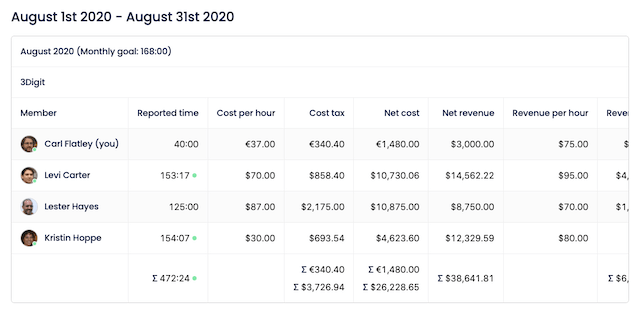
Sandtime.io groups reported time, cost, and revenue by team member and project. These reports can be exported and used when preparing an invoice. Review rates, rounding, and billable status before sending a client a bill.
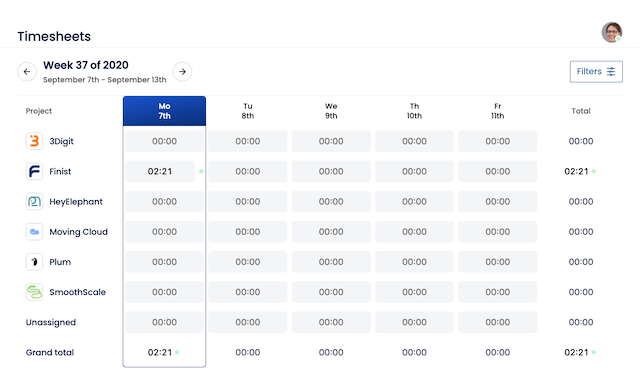
Weekly timesheets give you the other half of the picture: a clear grid showing recorded time by project, so a manager can review and approve it in one place.
How can Sandtime.io show project progress?
Project and phase reports compare recorded time with the team's estimate or budget settings. This can show when a fixed-price or retainer project is using more hours than planned, but it depends on timely entries and correct rates.
How do you get started?
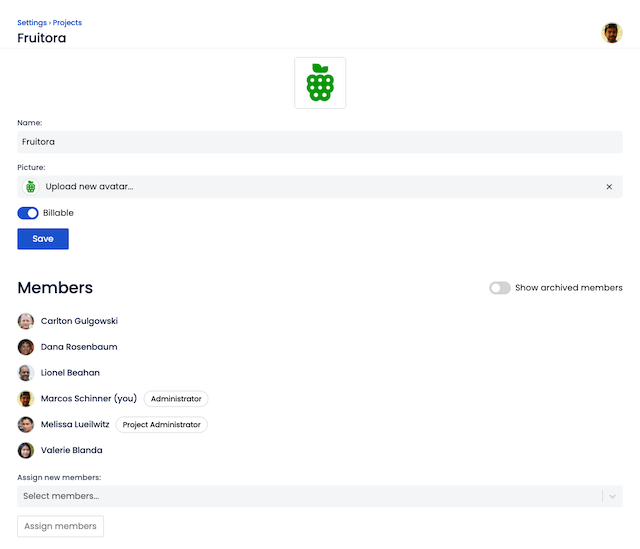
Create an account with your email or use a supported sign-in provider, create a client and project, then invite the team. Browser, extension, and app availability can differ by device, so test the method your team plans to use.
What does Sandtime.io cost?
- Free - unlimited users and every core feature, no credit card required
- Premium - more advanced controls, coming soon
- Enterprise - self-hosting, extended security, and compliance controls for larger teams
What should you know before you choose it?
Test exports, permissions, approvals, rounding, currencies, and account deletion with a sample project before moving billing records. Decide who corrects missed or disputed time. If you need payroll, accounting, location tracking, or a binding audit trail, confirm those requirements directly instead of assuming a time report provides them.
Who may find it useful?
Sandtime.io may suit freelancers, consultants, agencies, and small teams that bill by the hour or use retainers. It may be less suitable for a company that needs a mature payroll system, a large set of enterprise controls, or automatic proof of activity.
Who operates Sandtime.io?
Sandtime.io is built and run by Sanddev, the same company that builds Patriot Mail. Its privacy policy and terms describe how the service handles accounts and work records. Review those documents rather than relying on this related-party guide alone.
Common questions
What is included in the Sandtime.io free plan?
The current free plan covers unlimited users, timers, timesheets, projects, reports, and exports, with no credit card required. Premium and Enterprise choices have separate features and terms.
Will it monitor or spy on my team?
Sandtime says the product does not take screenshots, record keystrokes, or assign productivity scores. Team members report time, and a manager can review or approve it.
Can I get my hours out for invoicing?
Yes. Build weekly, monthly, or custom-range reports by team member and project, then export them to Excel, print a summary, or share a report.
What devices does it work on?
Track from any browser, a Chrome extension, or a Slack command, plus native apps for iOS, Android, macOS, and Windows - all kept in sync.
Sources checked September 18, 2026
- Sandtime.io features, for timers, projects, reports, and supported workflows
- Sandtime.io pricing, for current free, nonprofit, premium, and enterprise choices
- Sandtime.io privacy policy, for account and work-record data practices
- Sandtime.io terms, for account and service conditions
What is the bottom line?
If the free plan, exports, and no-surveillance approach match your team, test it with one real project before moving every client.